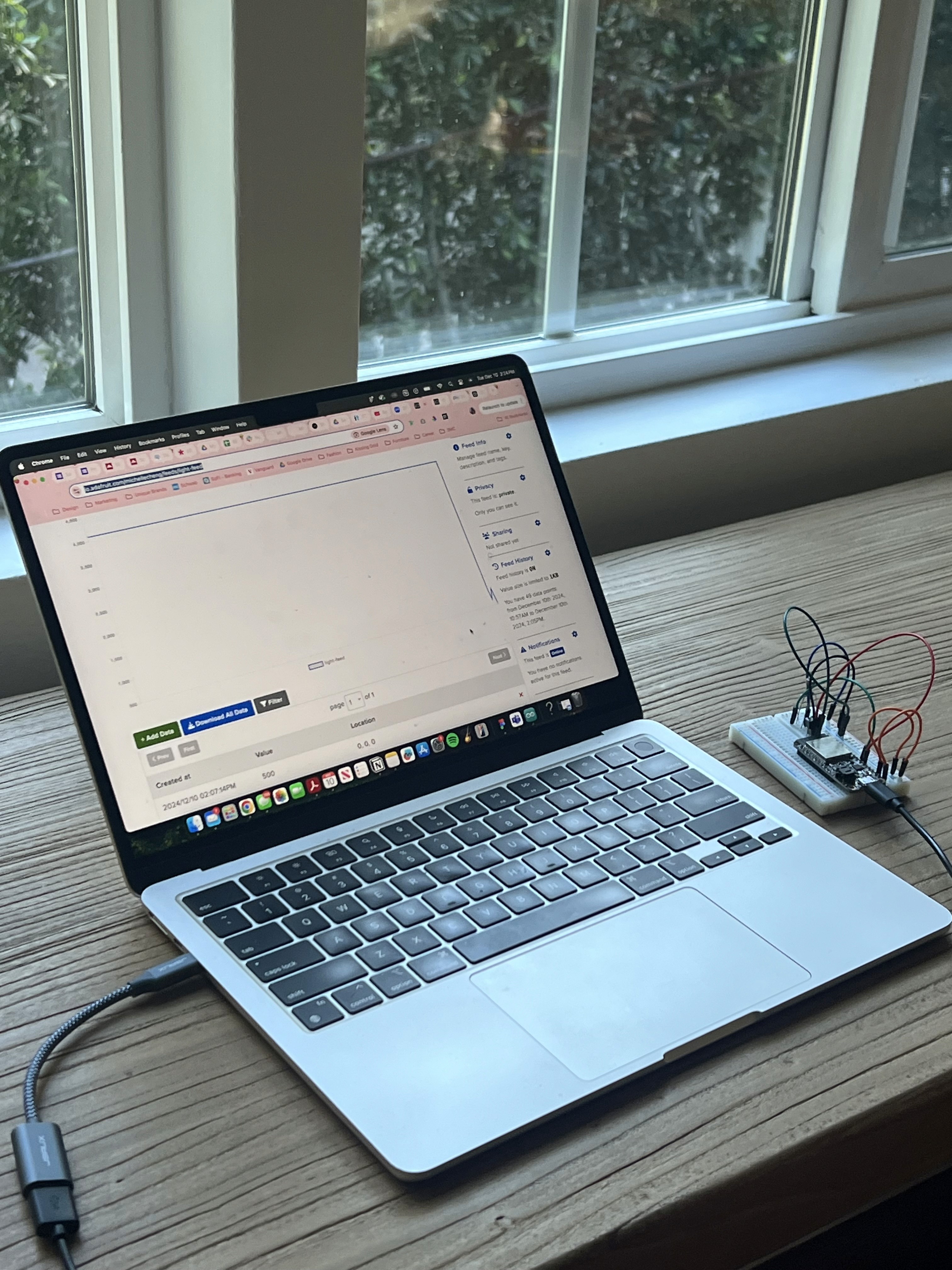
Light sensor

Read more

The Challenge

Design an internet-connected device that utilizes at least two sensors.

Solution

I created my own temperature and light monitoring system using a breadboard.

Role

Engineer

Industry

Electronics

Timeline

February 2025

Tools

Arduino

Photocel

Temperature sensor

02. Design challenge

How can I design my own temperature sensor and light monitoring system?

03. Understanding currents

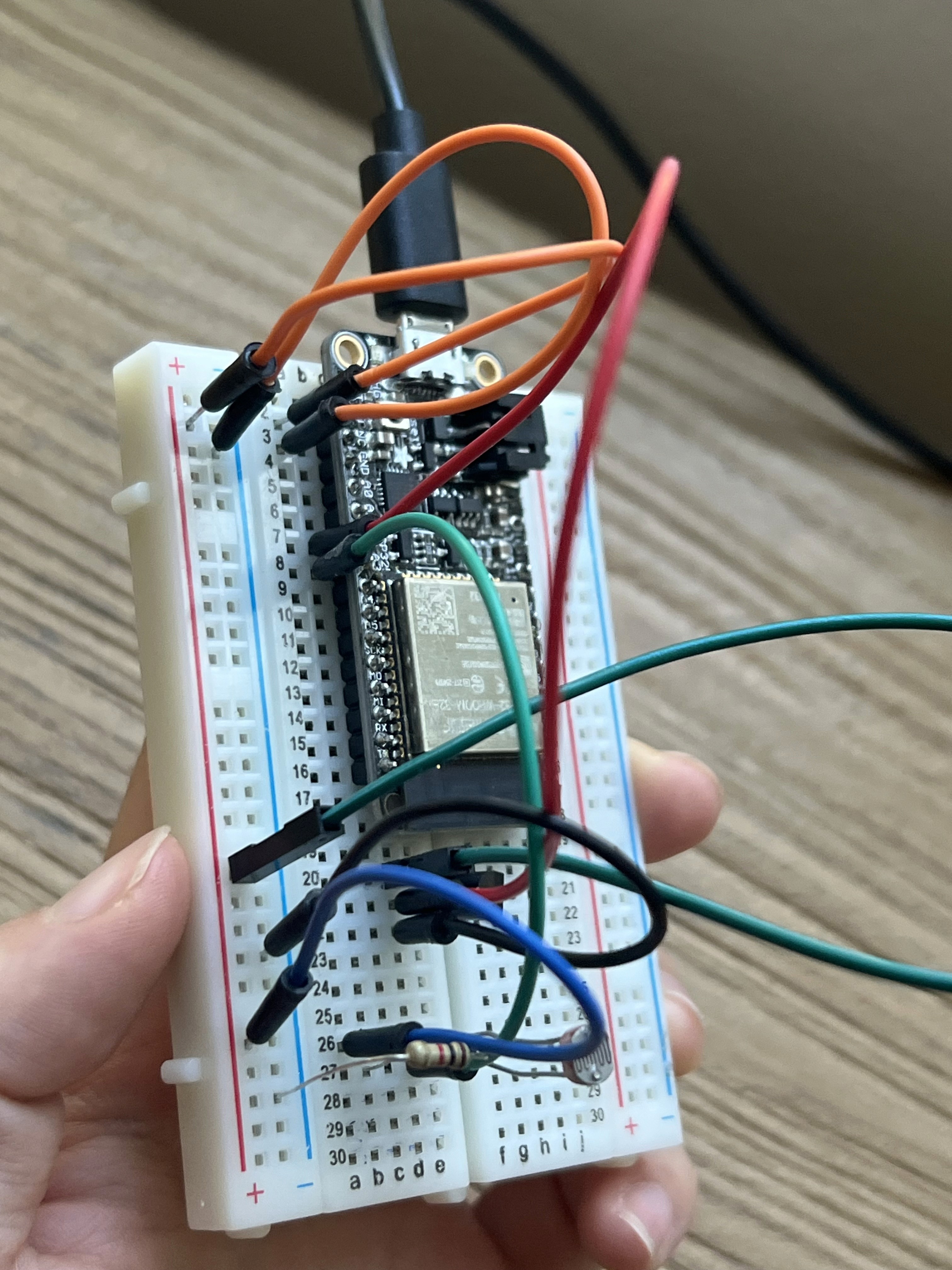
Configuring the breadboard

I configured an Arduino breadboard with a temperature sensor(connected to pin A2) and a photocell(connected to pin A3) to send their data to Adafruit IO. In the setup()function, the code starts communication with the computer using Serial.begin()and connects the Arduino to Adafruit IO. In the loop()function, the temperature sensor provides an analog reading, which is converted into a temperature in Celsius and sent to Adafruit IO. 

Simultaneously, the photocell provides a raw light reading, which is also sent to Adafruit IO. Based on the photocell's value, the code categorizes the light level into one of five categories: "Dark," "Dim," "Light," "Bright," or "Very Bright," and continuously updates the data on Adafruit IO for remote monitoring.
04. Light and temperature data

Collecting data at home

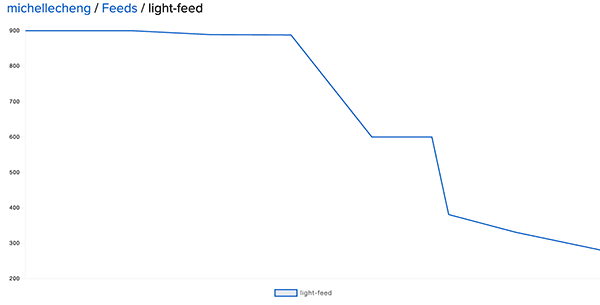
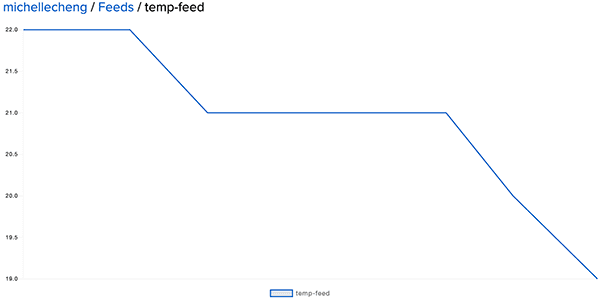
On the afternoon of December 10th, I collected data from my living room window at 30-minute intervals to observe changes in temperature and light levels over time. As expected, the light gradually diminished as the sun set, and the temperature also decreased steadily throughout the afternoon.Going from left to right I collected data from around 2:44pm to 5:44pm.
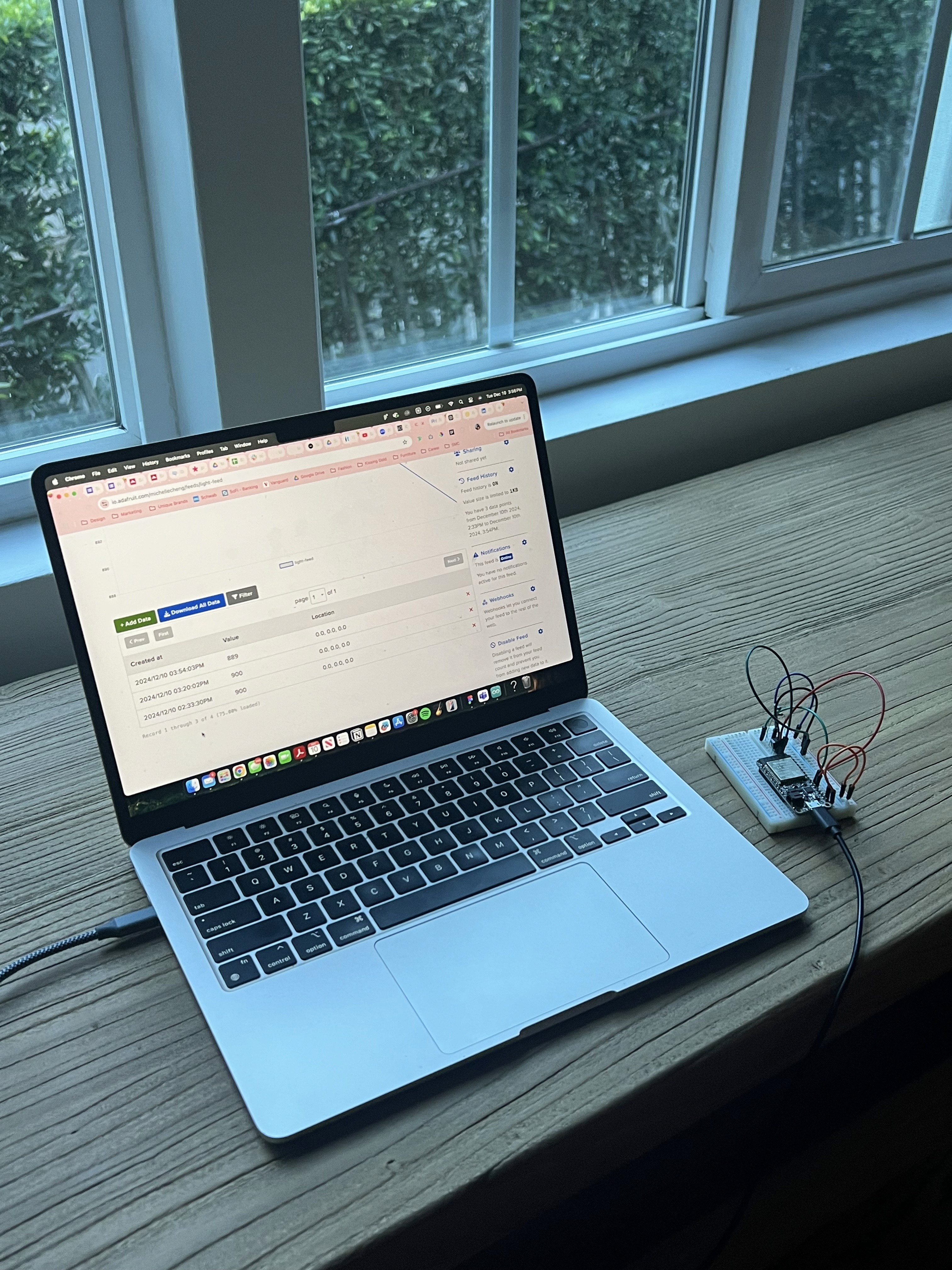
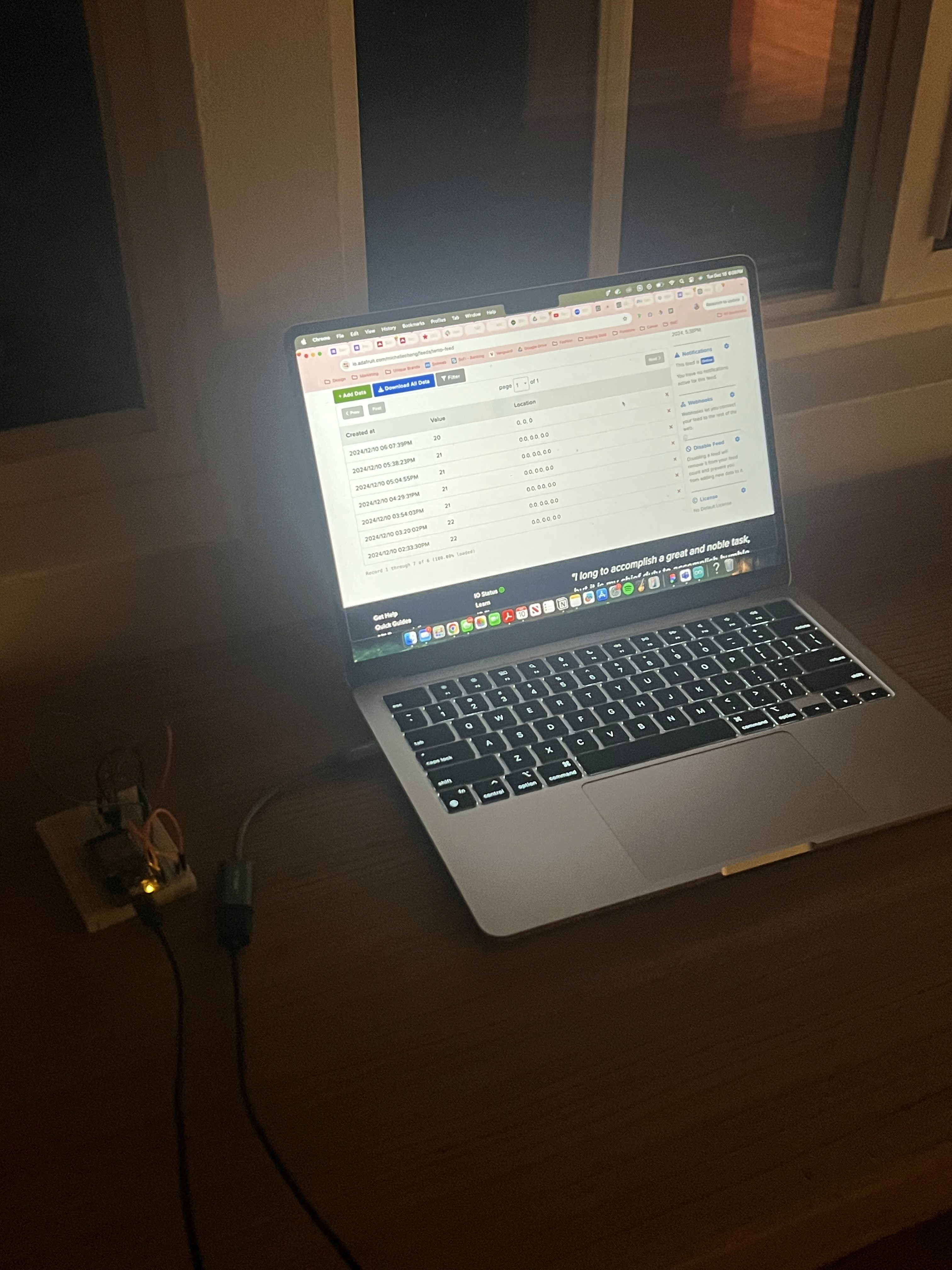
Light-Feed Graph displays the values collected from the photocell sensor and uploaded to Adafruit IO. Similarly, the Temp-Feed Graph shows the temperature data gathered from the temperature sensor and sent to Adafruit IO.
05. Converting data

Arduino code

I wanted to collect data from a temperature sensor and a photocell, then send the readings to Adafruit IO for remote monitoring. It connects to Adafruit IO, reads the sensor values, converts the temperature reading to Celsius, categorizes the light level, and uploads both sets of data every 60 minutes to allowing real-time tracking of temperature and light conditions.

#include "config.h"
// Define the sensors
#define TEMP_SENSOR_PIN A2 // Replace potentiometer with temperature sensor
#define PHOTOCELL_PIN A3 // Photoresistor remains the same
// Feeds for Adafruit IO
AdafruitIO_Feed *tempFeed = io.feed("temp-feed");
AdafruitIO_Feed *photoFeed = io.feed("photo-feed");
void setup() {
// Initialize Serial for debugging
Serial.begin(9600);
while (!Serial){}
Serial.println("Starting...");
Serial.print("Connecting to Adafruit IO");
io.connect();
// Wait for a connection to Adafruit IO
while (io.status() < AIO_CONNECTED) {
Serial.print(".");
delay(500);
}
Serial.println();
Serial.println(io.statusText());
}
void loop() {
io.run(); // Required to maintain Adafruit IO connection
// Read sensor values
int rawTempVal = analogRead(TEMP_SENSOR_PIN); // Read raw analog value from the temperature sensor
float tempC = (rawTempVal * 3.3 / 4096.0 - 0.35) * 100.0; // Convert to Celsius
float photoVal = analogRead(PHOTOCELL_PIN); // Read photoresistor value
// Send temperature data to Adafruit IO
Serial.print("Sending temperature: ");
Serial.print(tempC);
Serial.println(" °C");
tempFeed->save(tempC); // Send temperature to Adafruit IO
// Send photoresistor data to Adafruit IO
Serial.print("Sending photoresistor: ");
Serial.println(photoVal);
photoFeed->save(photoVal); // Send light value to Adafruit IO
delay(5000); // Wait for 5 seconds before sending the next values
}

06. Creating the artwork

Data visualization

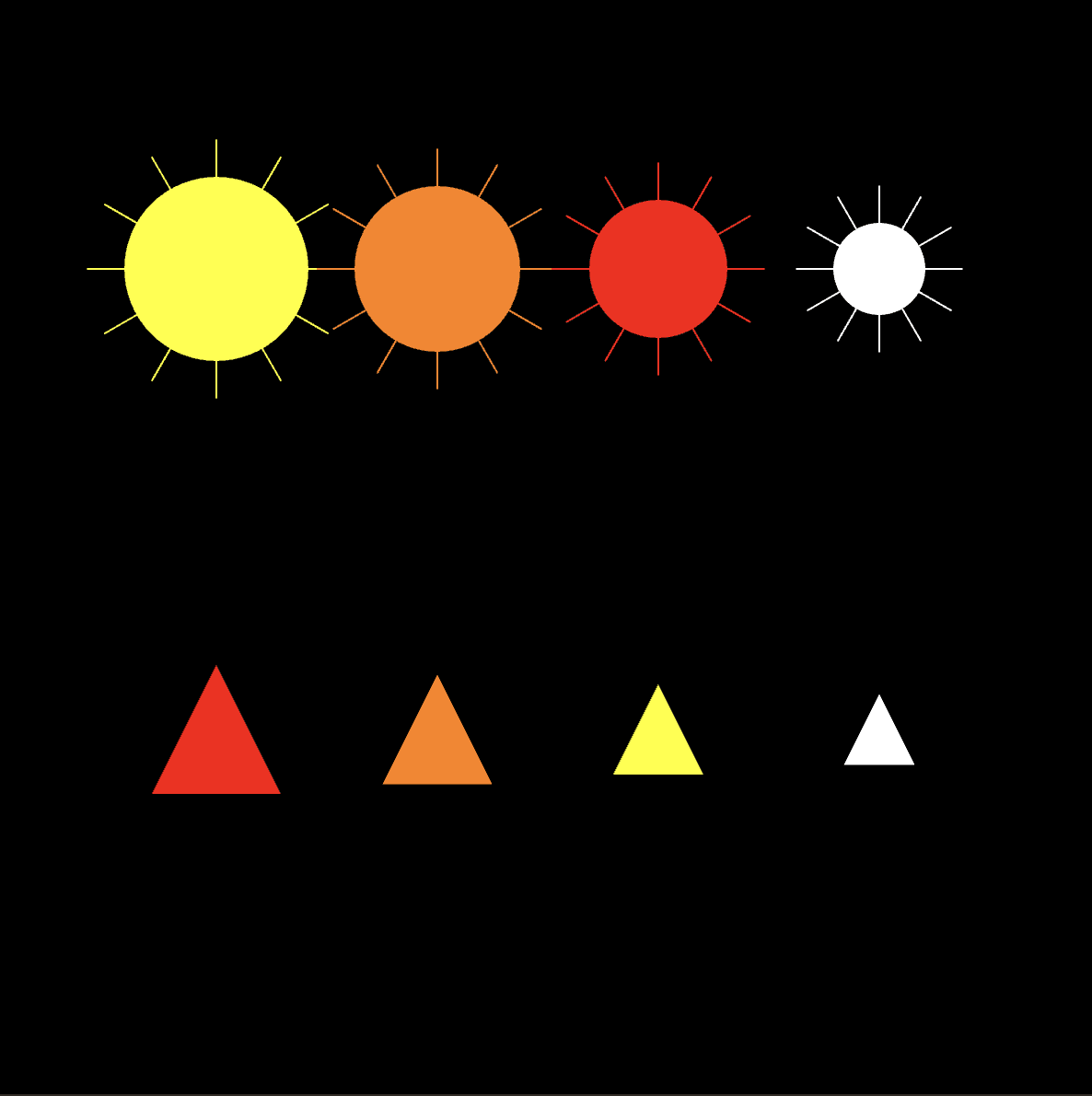
I chose to use suns and flames to visually represent the light and temperature data from my sensors. The size of each sun and flame corresponds directly to the respective data value, making it easy to compare the two datasets. Each color represents a different half-hour period, providing a clear and intuitive way to track trends and variations in both temperature and light over time.
//Temperature data is displayed as red vertical bars on the left half of the canvas, while light data is displayed as blue vertical bars on the right. The height of each bar corresponds to the respective data value.


let baselightURL = "https://io.adafruit.com/api/v2/michellecheng/feeds/photo-feed";
let basetempURL = "https://io.adafruit.com/api/v2/michellecheng/feeds/temp-feed";
let dataOption = "data";
let limitQuery = "limit=";
let includeQuery = "include=";
let tempValues = [];
let lightValues = [];

function setup() {
  createCanvas(800, 800);
  noStroke();

  // Fetch data every 5 seconds
  setInterval(() => {
    fetchTempData();
    fetchLightData();
  }, 5000);

  // Initial data fetch
  fetchTempData();
  fetchLightData();
}

function draw() {
  background(0); // Black background

  drawTemperatureGraph();
  drawLightGraph();
}

function drawTemperatureGraph() {
  let barWidth = (width / 2) / Math.max(tempValues.length, 1); // Width of each bar

  fill(255, 0, 0); // Red color for temperature
  for (let i = 0; i < tempValues.length; i++) {
    let x = i * barWidth; // Position of the bar
    let barHeight = map(tempValues[i], -20, 50, 0, height / 2); // Map temperature values to bar height
    rect(x, height / 2 - barHeight, barWidth - 2, barHeight); // Draw bar
  }
}

function drawLightGraph() {
  let barWidth = (width / 2) / Math.max(lightValues.length, 1); // Width of each bar

  fill(0, 0, 255); // Blue color for light
  for (let i = 0; i < lightValues.length; i++) {
    let x = width / 2 + i * barWidth; // Position of the bar
    let barHeight = map(lightValues[i], 0, 4095, 0, height / 2); // Map light values to bar height
    rect(x, height - barHeight, barWidth - 2, barHeight); // Draw bar
  }
}

async function fetchTempData() {
  try {
    let url = `${basetempURL}/${dataOption}?${limitQuery}10&${includeQuery}value`;
    let response = await fetch(url);

    if (!response.ok) {
      throw new Error(`HTTP error! status: ${response.status}`);
    }

    let data = await response.json();
    console.log("Raw temperature data:", data); // Log raw response

    tempValues = data.map((d) => parseFloat(d.value) || 0);
    console.log("Processed temperature values:", tempValues); // Log processed values
  } catch (error) {
    console.error("Error fetching temperature data:", error);
  }
}

async function fetchLightData() {
  try {
    let url = `${baselightURL}/${dataOption}?${limitQuery}10&${includeQuery}value`;
    let response = await fetch(url);

    if (!response.ok) {
      throw new Error(`HTTP error! status: ${response.status}`);
    }

    let data = await response.json();
    console.log("Raw light data:", data); // Log raw response

    lightValues = data.map((d) => parseFloat(d.value) || 0);
    console.log("Processed light values:", lightValues); // Log processed values
  } catch (error) {
    console.error("Error fetching light data:", error);
  }
}

07. Connecting engineering and design

Retrospective

For this project, I set out to create an Internet-connected device that would collect data using two sensors: a temperature sensor and a photo/light sensor. The goal was to monitor environmental conditions in my living room for an afternoon, providing valuable insights into the fluctuations of temperature and light levels. I chose to use a temperature sensor and a photo/light sensor because they provided a good balance between simplicity and useful data. The temperature sensor allowed me to monitor the temperature in the room, while the light sensor captured changes in ambient light levels, both of which are essential for understanding the comfort and atmosphere of the space.

I knew that the data collection would need to be regular but not overly frequent, as sending too many data points at once could overwhelm the database and exceed the limits set by platforms like AdafruitIO (which restricts each feed to 30 data points). 

To address this, I opted to collect data every 30 minutes.This project gave me a deeper understanding of the practical aspects of working with Internet-connected devices and sensors. By creating a device that collected real-time data and visualized it in a meaningful way, I was able to gain insights into how temperature and light levels.
